Since videos are the foundation of today’s society, removing extraneous text from photos is more crucial than ever. With today’s AI video editing technologies, you may quickly and simply remove watermarks, subtitles, and other undesired elements from old recordings. These tools leverage cutting-edge technology, such as motion tracking, object recognition, and AI painting, to produce professional results with minimal effort.
The top 16 AI video editing tools for removing text are listed below. These technologies can improve the performance of writers, marketers, and artists.
Why Use AI to Remove Text from Videos?
Before AI, it took hours of masking, cloning, and editing by hand to get rid of writing. This type of removal is now possible with AI-powered tools:
➥ Remove watermarks and subtitles with precision
➥ Restore footage without damaging the background
➥ Support multiple formats like MP4, AVI, MOV, and 3GP
➥ Automate batch processing
➥ Work directly from browsers like Chrome, Firefox, and Safari
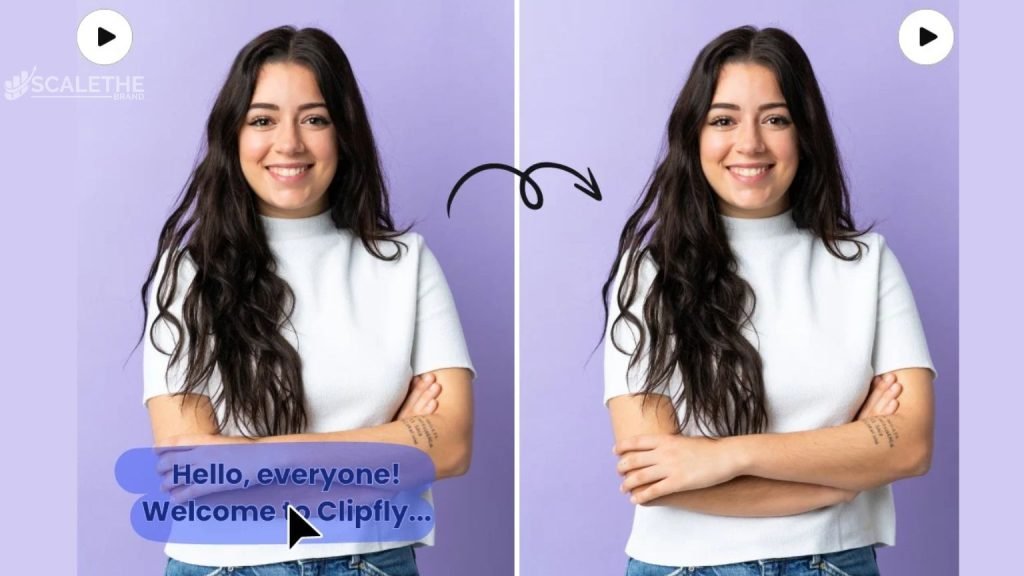
Common use cases include:
➥ Removing text from social media content
➥ Reusing video footage across platforms
➥ Cleaning up archive videos for new campaigns
Top 16 AI Video Editing Tools to Remove Text
The top 16 AI video editing programs that can easily remove text, watermarks, and other undesirable stuff from your films are listed below. These robust tools make video cleanup quick and easy by supporting a variety of formats like MP4, MOV, and AVI. These tools make it easy and precise to improve the quality of your videos, whether you’re editing professionally or not.
1. Runway ML
People know Runway ML for its advanced AI painting and object recognition tools. It has a cloud editor that can delete unwanted text or items.
Features of Runway ML
➥ Magic Eraser for seamless background blending
➥ Supports motion tracking for dynamic text removal
➥ Browser-based (works on Chrome, Firefox, Safari)
➥ Cloud-based editing environment
2. Adobe Premiere Pro
Adobe’s powerful editor now has Generative Fill via Adobe Sensei, which lets AI edit with content awareness.
Features of Adobe Premiere Pro
➥ AI-based object detection for frame-by-frame editing
➥ Motion tracking for dynamic text
➥ Integrates with Photoshop for precise fixes
➥ Supports formats like MP4, AVI, and MOV
3. Veed.io
A web-based tool that makes it easy to get rid of text, logos, and watermarks with just a few clicks.
Features of Veed.io
➥ Easy subtitle and watermark remover
➥ Ideal for TikTok and YouTube creators
➥ Exports in common formats like MP4
➥ Cloud-based interface
4. Descript
Descript has a powerful editor and can record voice, video, and the screen. It’s great for people who make material.
Features of Descript
➥ Timeline-based editing
➥ AI subtitle and caption removal
➥ Batch processing for longer content
➥ Great for podcasts, webinars, and talking-head videos
5. Media.io AI Watermark Remover
A free online AI video maker that focuses on being quick and easy to use.
Features OF Media.io AI Watermark Remover
➥ Supports MP4, MOV, AVI, and 3GP
➥ Simple drag-and-drop interface
➥ Batch editing support
➥ Works well in Chrome, Safari, and Firefox
6. HitFilm by FXhome
HitFilm uses both high-end VFX tools and AI to remove watermarks and objects.
Features OF HitFilm by FXhome
➥ AI-driven object tracking and inpainting
➥ Cloud-based sharing and exporting
➥ Suitable for professional-grade video editors
➥ Advanced masking tools
7. Unscreen Pro
Great for automatically getting rid of background text, overlays, or images that are embedded.
Features OF Unscreen Pro
➥ One-click removal of background text
➥ Web-based platform, no software download
➥ Designed for green screen and overlay content
8. Fotor AI
Fotor is a flexible AI-powered tool that can take out text and logos from pictures and videos.
Features of Fotor
➥ Machine-learning-based AI inpainting
➥ Supports MP4, AVI, and MOV
➥ Free trial with premium plans
➥ Great for content repurposing
9. Vidnoz AI
Vidnoz AI can process quickly and work with videos in all 360 degrees, which makes it perfect for editing immersive material.
Features of Vidnoz AI
➥ High-speed AI editing
➥ Supports 4K and 360° video
➥ Cloud-based with social media sharing
➥ Batch processing enabled
10. ClipMove
A newer but powerful platform that lets you remove writing and objects, smooth out motion, and fix colors.
Features of ClipMove
➥ AI text and object erasing
➥ Built-in color correction
➥ Regular feature updates
➥ Fast, cloud-based processing
11. Videoleap by Lightricks
With Videoleap, you can get rid of annoying text and overlays while blending the changed part into the background that was there before.
Features of Videoleap
➥ AI blending for a natural look
➥ Export to social platforms
➥ Useful for archival or educational content
12. Wondershare Filmora
Filmora has an editor that is easy to use and has advanced tools for removing objects, editing, and adding effects.
Features of Wondershare Filmora
➥ AI object/text removal
➥ Rich set of transitions and effects
➥ Supports MP4, AVI, and MOV
➥ Strong community and customer support
13. FlexClip
FlexClip has drag-and-drop AI tools that are great for creators of all types.
Features of FlexClip
➥ Remove text, people, or entire backgrounds
➥ Replace video backgrounds with AI
➥ Easy social sharing
➥ Affordable plans with a free tier
14. Kapwing
Kapwing is a browser-based video maker that lets you remove watermarks and make simple changes to videos.
Features of Kapwing
➥ Unlimited exports on a free plan (with a watermark)
➥ Pro/Business plans available
➥ Works on any device
➥ Good for short-form videos
15. CapCut
A lot of TikTok and YouTube artists use CapCut to make quick AI edits.
Features of CapCut
➥ AI to remove text and overlays
➥ Intuitive UI
➥ Supports MP4, MOV, AVI
➥ Works on mobile, desktop, and web
16. AniEraser
AniEraser is a professional-level program that gets rid of unwanted parts in high-quality movies.
Features of AniEraser
➥ Fast AI-driven processing
➥ Adjustable manual settings
➥ Batch editing supported
➥ Clean output with high-resolution support
How to Choose the Right Tool?
|
Feature
|
Best Tool(s)
|
|---|---|
|
Beginner-Friendly
|
HitPaw, Kapwing, FlexClip
|
|
Cloud-Based Editing
|
Veed.io, Runway ML, ClipMove
|
|
Advanced Precision
|
Adobe Premiere Pro, HitFilm, AniEraser
|
|
Short-Form Social Content
|
CapCut, Veed.io, Videoleap
|
|
Free Plans Available
|
Media.io, Fotor, Kapwing
|
|
Batch Processing
|
Descript, Vidnoz AI, Wondershare Filmora
|
|
High-Res 4K/360° Support
|
Topaz Video AI, Vidnoz AI
|
Final Thoughts
An extremely difficult task has been greatly simplified by AI Video Editing Tools to Remove Text. Every requirement and skill level now has a tool. You may clean up outdated footage, remove text from your TikToks, and remove subtitles. Selecting the appropriate instrument for your requirements is crucial. Do you desire cloud access, speed, accuracy, or bulk editing? You should have been able to make that decision with the aid of this list.
Frequently Asked Questions
Here are some answers to common questions
Q1: Can I remove subtitles or watermarks for free?
Yes, tools like Media.io and Kapwing offer free plans. However, you may see watermarks or export limits.
Q2: What formats do these tools support?
Most tools support MP4, MOV, and AVI formats, with some also accepting 3GP or 360° video.
Q3: Are these tools compatible with my browser or device?
You can use most of the tools on Chrome, Firefox, and Safari, as they are browser-based. Some, like CapCut, have apps for phones.
Q4: Is background blending important?
Of course. It helps the cut part of the video look clean and natural, especially when AI is used to paint on top of it.
Q5: Which tool is best for 360-degree or 4K content?
Vidnoz AI and Topaz Video AI are optimized for ultra-high-definition footage.