
Every day, billions of people turn to search engines like Google, Bing, or DuckDuckGo to find answers, discover new ideas, shop online, or learn something new. But have you ever thought about how these search engines work behind the scenes?
Understanding how search engines work is more than just a fun fact. It’s beneficial, whether you’re a content creator, business owner, student, or everyday internet user. Knowing the Search Engine basics can help you:
▸ Create better content that people find and read.
▸ Improve your website’s visibility in search results.
▸ Search smarter, save time, and get more accurate answers.
We’ll explore the step-by-step process of how search engines work that powers every search, from crawling the web to ranking results, and break it down in simple, clear terms.
What is a Search Engine?
A computer instrument that aids people in finding information on the internet is called a search engine. In a split second, it sorts, ranks, and analyzes billions of web pages to provide the most pertinent results for a user’s query. This procedure forms the basis of a collection of tactics known as Search Engine Optimization (SEO), which is used to increase a website’s exposure in search results. What exactly is SEO, then? It’s the art and science of optimizing your technological site structure and content to rank higher in search results and naturally reach more people.
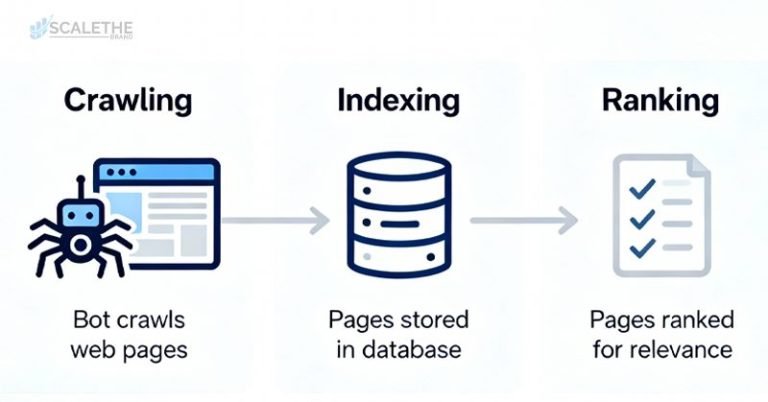
The 3 Main Steps of How Search Engines Work
To help you find what you’re looking for in seconds, search engines follow a structured process that happens in the background. This process has three main steps:
▸ Crawling
▸ Indexing
▸ Ranking
What Is Crawling?
Crawling is the first step search engines take to discover new or updated content on the internet. Specialized programs, often called web crawlers, browse the web by visiting links from page to page, just like a person clicking around a website, but at a massive scale and speed.
How Web Crawlers Work (Spiders, Bots)
Search engines use bots (also called spiders or crawlers) to scan the content of websites. These bots start with a list of known web pages and follow links to new ones, collecting data as they go. This helps search engines understand what each page is about and whether it should be indexed for search results.
Popular Crawling Tools
While Google uses its crawler called Googlebot, there are other helpful tools for site owners to test and improve crawlability:

|
Tool Name
|
What it does
|
|---|---|
|
Screaming Frog SEO Spider
|
A desktop tool for crawling websites like a search engine would
|
|
Ahrefs and SEMrush Site Audit
|
Great for identifying crawl errors and SEO issues
|
|
Google Search Console
|
Provides direct insights into how Google crawls and indexes your site
|
Crawl Budget: What It Is & Why It Matters
Crawl budget refers to the number of pages a search engine will crawl on your website within a given time. Large sites with many pages need to manage this wisely. If your site has broken links, duplicate content, or poor internal structure, it could waste your crawl budget, and important pages might get ignored.
Common Crawl Errors and How to Fix Them
Some frequent crawling issues include:
▸ 404 Errors (page not found)
▸ Redirect Loops
▸ Blocked resources (from robots.txt)
▸ Server errors (5xx)
Fixing these requires ensuring that all important pages are accessible, links aren’t broken, and server performance is stable.
Optimize Your Site for Crawling
Here are a few technical ways to help search engines crawl your site efficiently:
▸ Robots.txt: A file that tells bots which pages or sections to skip. Use it carefully to avoid blocking important content.
▸ XML Sitemap: A roadmap of your website that helps search engines discover all your key pages.
▸ Internal Linking: Linking between pages on your site helps crawlers find and navigate content.
▸ Canonical Tags: Use these to signal which version of a page is the “main” one when you have duplicate or similar content.
What Is Indexing?
Indexing is the process by which search engines store and organize the information they find during crawling. Once a page is indexed, it becomes eligible to appear in search results. Think of indexing like adding a book to a digital library; until it’s indexed, no one can find it in the system.
How Indexing Works
After a crawler visits your page, it analyzes the content, HTML structure, keywords, and other elements. If the page is valuable and follows search engine guidelines, it gets added to the search engine’s index, a massive database of online content. Only indexed pages can be ranked and shown to users.
What Content Gets Indexed (and What Doesn’t)
Search engines aim to index useful, unique, and accessible content. Pages that often don’t get indexed include:
▸ Duplicate content
▸ Thin or low-quality pages
▸ Pages blocked by robots.txt or meta noindex tags
▸ Orphan pages (no internal links pointing to them)
▸ Password-protected or private content
Tools for Monitoring Indexing
To see which pages of your website are indexed (or not), you can use:
▸ Google Search Console (Use the “Pages” report under Indexing to check status and troubleshoot issues)
▸ Bing Webmaster Tools (Offers similar insights for Bing’s index)
▸ Site Search (A quick way to check indexed pages in Google manually)
How to Optimize for Indexing
You can increase your chances of getting content indexed properly by following these best practices:
▸ Meta Tags & Robots Directives: Use the <meta name=”robots” content=” index, follow”> tag to allow indexing. Avoid using “noindex” unless necessary.
▸ Clean Site Architecture: Make sure your site has a logical structure, with clear navigation and internal links that help crawlers find pages easily.
▸ High-Quality, Crawlable Content: Ensure every page offers unique, useful content that loads quickly and doesn’t hide key information behind scripts.
▸ Duplicate Content & Canonicalization: If similar pages exist (e.g., product variants or blog tags), use canonical tags to tell search engines which version to index.

What Is Ranking?
Search engines utilize ranking to decide which sites show up first when a user types a query. Your page may show up on pages 5 or 10 of results, where few people look, if it is indexed but not ranking well. Reaching a higher rank increases your website’s visibility, hits, and traffic.
How Algorithms Rank Content
Search engines use complex algorithms to evaluate and rank content. These algorithms consider hundreds of factors to decide which pages best answer a searcher’s question. The aim is to present the most relevant, helpful, and reliable information at the top of the results.
Major Google Ranking Factors
While the full algorithm is a closely guarded secret, Google has confirmed many important ranking signals:
▸ Backlinks: Links from other reputable websites act as “votes of confidence” for your content. The more high-quality backlinks you have, the better your chances of ranking.
▸ Relevance & Keyword Usage: Your content should match the user’s intent and include naturally used keywords (especially in titles, headings, and first paragraphs).
▸ Content Freshness: Recent or regularly updated content tends to rank better for time-sensitive topics (e.g., health trends, tech news).
▸ Page Speed: Fast-loading pages offer a better user experience and are more likely to rank higher, especially on mobile.
▸ Mobile-Friendliness: With mobile-first indexing, Google prioritizes how well your site performs on smartphones and tablets.
RankBrain and Machine Learning in Search
RankBrain is Google’s machine learning system that aids in understanding complex search queries and adjusts rankings based on user behavior. Instead of just matching keywords, RankBrain tries to understand search intent and context. This means well-written, user-focused content often ranks better than keyword-stuffed pages.
In addition to keyword matching, modern search engines rely on semantic search to understand meaning and context. So, what is semantic search? Google can interpret user intent, synonyms, and topic relationships rather than just exact words. This shift makes it important to write comprehensive, naturally flowing content rather than just inserting keywords.
Engagement Metrics (CTR, Bounce Rate, Dwell Time)
User engagement also influences ranking. Google monitors how users deal with search results:
▸ Click-Through Rate (CTR): Do people click on your result?
▸ Bounce Rate: Do they leave immediately without engaging?
▸ Dwell Time: How long do they stay on your page before returning?
The more positive these signals are, the more search engines may trust that your content satisfies the user’s needs.
Personalization of Results
Search engines like Google don’t show the same results to everyone. Even if two people type the same search query, they might see different pages in different orders. This is because Google personalizes results based on several factors to better match each user’s context and preferences.
How Google Personalizes Based on:
Google personalizes results based on the following factors:
▸ Location : Google uses your geographic location to tailor search results. For example, searching “coffee shop near me” in New York will show different places than the same search in Los Angeles. Even non-location-specific searches (like “herbal supplements”) may show local brands or stores if relevant.
▸ Device : Whether you’re using a mobile phone, tablet, or desktop, Google adjusts the results. Mobile users might see mobile-optimized websites ranked higher, and local map listings are more prominent on phones.
▸ Search History : Google looks at your past searches and clicks to understand what you’re interested in. If you often search for fitness-related topics, Google may prioritize health and wellness content in your future results, even if your current query is more general.
▸ Language Preferences : Google also considers your language settings. Someone searching from Spain with English set as their preferred language might see different results than someone using the same query in Spanish. This helps make content more understandable and relevant.
Handling Errors and Penalties
Even if your website is live and has great content, SEO mistakes can hurt your visibility. Search engines like Google may issue penalties if they detect behavior that goes against their quality guidelines. These penalties can decrease your rankings or ban your site from search results permanently.
What Are SEO Penalties?
An SEO penalty is a negative action taken by a search engine that affects your website’s ranking. Penalties are usually the result of tactics that aim to manipulate search results unfairly. Once penalized, your traffic can drop suddenly and dramatically.
Types of SEO Penalties: Manual vs. Algorithmic
There are following penalties:
▸ Manual Penalties : These are imposed by a human reviewer at Google. You’ll be notified in Google Search Console if your site gets one. Manual penalties often require direct fixes and a reconsideration request to recover.
▸ Algorithmic Penalties : These happen automatically through Google’s algorithms (like Panda or Penguin) when your site violates guidelines. You won’t be notified, but you might notice a sudden drop in traffic after an algorithm update.
Common Causes
Some of the most common reasons for SEO penalties are:
▸ Keyword Stuffing: Overloading content with repetitive keywords in an unnatural way.
▸ Cloaking: Showing another content to search engines than what users see.
▸ Link Spam: Buying or exchanging links to manipulate rankings, or using spammy backlinks.
▸ Duplicate or Thin Content: Having little value or the same content across many pages.
How to Identify and Fix Penalties
▸ Use Google Search Console to check for manual actions or indexing issues.
▸ Monitor traffic in Google Analytics; a sudden drop could mean an algorithmic penalty.
▸ Audit your site for:
- Unnatural keyword use
- Bad backlinks (use the disavow tool)
- Poor content quality
- Technical issues (slow speed, broken pages.
▸ Once fixed, submit a reconsideration request if the penalty was manual.
Use of Redirects and Custom 404 Pages
▸ 301 Redirect (Permanent): Use this when a page is permanently moved to a new URL.
▸ 302 Redirect (Temporary): Use this only when the change is short-term.
▸ Custom 404 Page: Instead of a blank “Page Not Found” screen, create a helpful 404 page that guides users back to your homepage or key sections.
Technical SEO and Site Architecture
Technical SEO is all about making sure your website is easy for search engines to crawl, render, and index. Even great content can get buried if your site has poor structure or technical issues. This section focuses on the behind-the-scenes elements that help your site perform better in search.
Role of JavaScript and Rendering
Modern websites often rely on JavaScript for dynamic features, but search engines don’t always render JavaScript content easily. If your key content or links load only after scripts run, it might not be indexed. Use tools like Google Search Console’s URL Inspection Tool or Google’s Mobile-Friendly Test to see how your pages render. When possible, use server-side rendering or progressive enhancement for better SEO.
Robots Meta Tags vs. X-Robots-Tag
Both are used to control how search engines crawl and index pages, but they work in different ways:
▸ Robots Meta Tags are placed in the HTML of individual pages. Example: <meta name=”robots” content=”noindex, nofollow”>
▸ X-Robots-Tag is a server-side directive sent in HTTP headers, useful for non-HTML files (like PDFs or images). Example: X-Robots-Tag: noindex
Use them wisely to prevent indexing of private, duplicate, or irrelevant content.
URL Parameters and GSC Settings
URL parameters (like ?sort=price) can create duplicate content issues if not handled properly. In Google Search Console (GSC), you can specify how Google should treat these parameters. Alternatively, use canonical tags or parameter handling rules in GSC to avoid dilution of crawl budget and ranking signals.
Avoiding Redirect Chains
A redirect chain happens when one page redirects to another, which then redirects again. This slows down loading, weakens link equity, and can confuse crawlers. Best practices:
▸ Keep redirects direct and minimal (ideally just one step).
▸ Regularly audit your site for unnecessary or broken redirects using tools like Screaming Frog or Ahrefs.
Optimizing Core Web Vitals
▸ Core Web Vitals are performance metrics Google uses to measure user experience:
▸ Largest Contentful Paint (LCP) (How fast your main content loads)
▸ First Input Delay (FID) (How quickly your site responds to user interaction)
▸ Cumulative Layout Shift (CLS) (How stable the layout is while loading)
Improving these metrics can boost rankings and user satisfaction. Techniques include:
▸ Compressing images
▸ Reducing JavaScript bloat
▸ Using a fast, reliable hosting provider
▸ Prioritizing mobile speed
SERP Features and Evolving Results
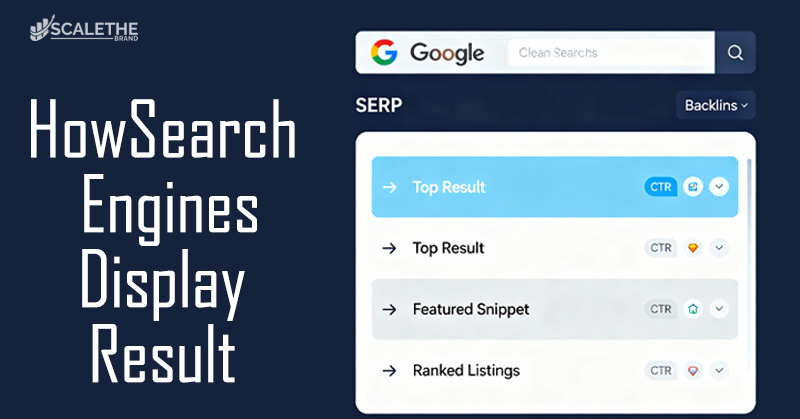
The Search Engine Results Page (SERP) has changed a lot over the years. It’s no longer just a list of 10 blue links. Google now uses various SERP features to give users faster, more useful answers, sometimes without needing to click on a website. Understanding these features is key to maximizing your visibility in search.
Featured Snippets
Featured snippets are boxed answers that appear at the top of search results, also known as “position zero.” They usually answer a question directly using content pulled from a web page, along with a link to the source. Types of featured snippets include:
▸ Paragraphs
▸ Lists (bulleted or numbered)
▸ Tables
People Also Ask (PAA)
This section shows expandable questions related to the user’s search. Each box contains a short answer pulled from a different website, with a link for more info. Try to use target long-tail keywords and Q&A formats in your content to increase the chances of appearing here.
Knowledge Panels
Knowledge panels appear on the right-hand side (desktop) or top (mobile) and provide summarized info about people, places, brands, or topics. They’re often sourced from trusted data sources like Wikipedia, Google My Business, and Wikidata. For businesses or public figures, create and verify a Google Business Profile and maintain consistent information across the web.
Local Pack
The Local Pack appears for location-based searches (like “vegan cafe near me”) and displays a map with three top local listings, along with ratings, hours, and directions. Try to optimize your Google Business Profile, get reviews, and use local keywords to appear in these listings.
AI Overviews
Google has started rolling out AI Overviews (previously known as Search Generative Experience or SGE), which generate summaries using AI at the top of search results. These provide information from multiple sources and aim to answer complex or multi-part questions quickly. Focus on expertise, authority, and trust (E-A-T) and structure your content clearly to increase the likelihood of being referenced in AI-generated summaries.
Final Thoughts:
In simple words, search engines work like smart librarians that scan, organize, and rank billions of web pages to help people find the right information quickly. You might ask, How do search engines work so fast and accurately? It all comes down to three main steps: crawling, indexing, and ranking. By understanding how these steps function, you can make your content easier to find. For example, using clear headings, good keywords, and fast-loading pages helps search engines trust your site.
Fixing broken links and keeping your site mobile-friendly also improves your chances of showing up higher in search results. Whether you’re a blogger, business owner, or student, applying these tips makes a big difference. Just like setting up a clean, well-organized shop brings more customers, a well-optimized website brings more visitors. Now that you know the process, you can use it to create content that both people and search engines love.
Frequently Asked Questions
Here are some answers to common questions
How do search engines work?
They work in three steps: crawling (finding content), indexing (organizing it), and ranking (showing the best results first).
How does Google personalize search results?
Google personalizes results based on your location, device, search history, and language settings.
How do search engines rank websites?
Search engines use algorithms to rank websites based on many factors like content quality, keyword relevance, backlinks, site speed, mobile-friendliness, and user experience.
What are SEO penalties?
SEO penalties are punishments from Google when a site breaks rules, like using spammy tactics or low-quality content.
How can I fix SEO penalties?
Use tools like Google Search Console to find and fix problems, then improve your content and structure.
Why is HTTPS important for SEO?
HTTPS makes your site secure and trusted, which helps improve your rankings in search engines.
What are SERP features?
These are special result types like featured snippets, “People Also Ask,” and local map packs that give users quick answers.